- Why the Email Around Your Resume Matters
- What to Prepare Before You Send Your Resume
- Save Your Resume in the Right File Format
- Name Your File Correctly
- Set Up a Professional Email Address
- How to Send a Resume via Email: Step by Step
- What Not to Do When Following Up
- Emailing a Resume Directly vs Applying Through a Portal
- Subject Line Examples for Every Situation
- Sample Emails You Can Copy and Use
- Template 1: Standard Job Application
- Template 2: Applying Through a Referral
- Template 3: Cold Outreach With No Open Listing
- Template 4: Follow Up After No Response
- Sending a Resume From Your Phone
- Common Mistakes to Avoid
- Final Tips Before You Hit Send
- Frequently Asked Questions
- Should I always include a cover letter with my resume email?
- What if the employer does not list a specific email address?
- How large can my resume attachment be?
- Should I follow up if I do not hear back?
- Is it better to send my resume Tuesday through Thursday?
You finished your resume but don’t know how to send it via email professionally.
This is the part where a lot of job seekers freeze. What do you write in the subject line? What goes in the body of the email? Do you attach the resume as a PDF or a Word file? A strong resume can lose its impact if the email around it feels rushed or unclear.
The good news is that sending a resume by email is simple once you know the format. This guide walks you through every step, from preparing your file to writing the email itself. You will also find ready to use resume samples for different situations, so you can copy what fits and send it today.
Before you even get to this step, it helps to build a resume with an AI powered content suggestion tool, so the document you are about to send is already clean, organized, and ready for a recruiter’s inbox.
Why the Email Around Your Resume Matters
A hiring manager often reads your email before they open your resume. That short message sets the tone. It tells them who you are, what job you want, and whether you take the process seriously.
A messy or unclear email can hurt a strong resume. A short mistake, like a vague subject line or a missing attachment, can push your application to the bottom of a busy inbox. The goal is simple. Make the email easy to read, easy to act on, and professional from the first line.
What to Prepare Before You Send Your Resume
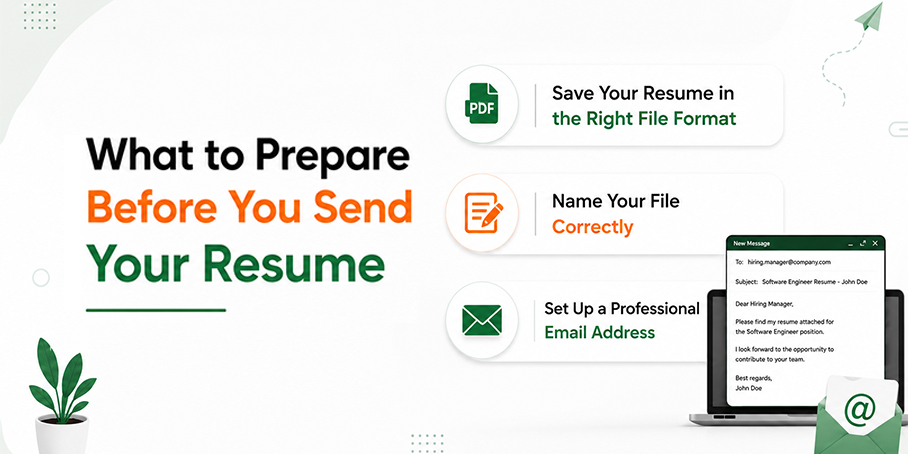
A few small details can make a big difference before you hit send. Taking a few minutes to check your resume, file name, and email setup helps you present a professional image and ensures employers can easily review your application.
Save Your Resume in the Right File Format
Most employers expect a PDF. A PDF keeps your formatting locked in place, so it looks the same on any device. Some employers ask for a Word document instead, often because their system needs to scan the text.
Check the job posting first. If it gives no instructions, send a PDF. This is also where file format connects to applicant tracking systems. Many companies use software that scans resumes for keywords and formatting before a human ever sees them. A clean file, built with a smart & free resume builder, exports in formats that these systems can read without errors.
Name Your File Correctly
Do not save your resume as “Resume” or “Final Version 2.” A generic name makes it harder for a recruiter to find your file later, and it looks careless.
Use a simple formula instead: FirstName LastName Resume
For example: James_Carter_Resume.pdf
This small step helps your file stand out once it lands in a folder full of other applicants.
Set Up a Professional Email Address
Your email address is one of the first things a hiring manager notices. An address built from your name looks professional. An old or casual address can send the wrong signal before they even open your message.
Use a simple format like firstname.lastname@email.com. If that is taken, add a middle initial or a number that still looks clean.
According to the University of San Francisco Career Services Center, applicants should always follow the employer’s stated instructions for file format and subject lines, and when no instructions are given, sending the resume as a clearly named attachment is the safest choice.
This guidance lines up with what most hiring teams expect today, even years after it was first written.
How to Send a Resume via Email: Step by Step
- Read the job posting closely. Look for exact instructions on format, subject line wording, or required attachments.
- Write a clear subject line. Include your name and the job title so the recruiter knows exactly what they are opening.
- Start with a short, direct greeting. Use the hiring manager’s name if you have it. If not, a simple professional greeting works fine.
- Write a brief opening line. State the job you are applying for and where you found it.
- Add a short value focused paragraph. Mention one or two strengths that connect to the role.
- Attach your resume and cover letter. Double check that both files are attached before you write anything else.
- Mention the attachments in your email. A short line like “I have attached my resume and cover letter for your review” avoids confusion.
- Close with a professional signature. Include your full name, phone number, and a link to your professional profile if you have one.
- Proofread everything. Read the subject line, body, and attachment names one more time.
- Keep Your Email Formatting Simple. Use standard fonts like Arial or Calibri and avoid colored text, background colors, or decorative formatting. A clean, simple email looks professional and displays correctly across different email platforms.
- Send a test email to yourself first. This confirms your formatting and attachments look right before the real send.
What happens next? If you do not hear back within one to two weeks, learn how to write a professional follow up job application email to express your continued interest and remind the employer that you are still interested in the role.
What Not to Do When Following Up
- Do not turn on read receipts. Many recruiters see them as intrusive or unnecessary.
- Avoid sending multiple follow up emails within a few days. Wait about one week before your first follow up, then give the employer time to respond.
- Do not contact recruiters repeatedly through email, LinkedIn, and phone calls for the same application.
Emailing a Resume Directly vs Applying Through a Portal
Not every job wants a direct email. Many companies now use an online application portal, and skipping it to email a recruiter directly can actually work against you.
Check the job posting first. If it says to apply through a portal, follow that process. Many employers use online job platforms such as Jump Recruiter, where you can search for jobs, submit applications, and apply faster through a single account.
Save the direct email approach for smaller companies, referrals, or cold outreach where no formal application process is listed. When you do have a direct contact, a personal email can help your application stand out and give your resume a better chance of being seen by a recruiter.
Subject Line Examples for Every Situation
Your subject line is often the deciding factor in whether an email gets opened. Keep it short, specific, and free of unnecessary words.
| Scenario | Subject Line Example |
| Standard application | Marketing Coordinator Application, Emily Elizabeth Davis |
| Referral | Referred by John Lee, Data Analyst Application, Oliver Thomas Wright |
| Cold outreach | Experienced Project Coordinator Interested in Your Team |
| Follow up | Following Up: Marketing Coordinator Application, James Miller |
| Applying with a job ID | Customer Success Manager, Job ID 4521, Charlotte Grace Taylor |
| Internship application | Marketing Internship Application, Summer |
Avoid subject lines like “Resume” or “Job Application.” These give the recruiter no context and are easy to overlook.
Sample Emails You Can Copy and Use
Every hiring situation is different, so your email should match the context. Use the templates below as a starting point, then customize the job title, company name, and your experience to make your application more relevant and professional.
Template 1: Standard Job Application
| Subject: Project Coordinator Application – Emily Elizabeth Davis Dear [Hiring Manager Name], I am writing to express my interest in the [Job Title] position listed on [Where you found the job, e.g., Jump Recruiter]. With over four years of experience coordinating cross-functional projects, I am confident in my ability to bring value to your team.My resume and cover letter are attached for your review. I look forward to the opportunity to discuss how my background aligns with your needs. Best regards, Emily Elizabeth Davis 555-123-4560 linkedin.com/in/username |
Template 2: Applying Through a Referral
| Subject: Referred by John Lee, Data Analyst Application, Oliver Thomas Wright Dear Rose Cooper, John Lee suggested I reach out about the Data Analyst opening on your team. I have two years of experience building dashboards and reporting tools, and John felt my background would be a strong fit.My resume is attached. I would welcome the chance to discuss the role further. Best regards, Oliver Thomas Wright 555 123 4562 |
Template 3: Cold Outreach With No Open Listing
| Subject: Experienced Project Coordinator Interested in Your Team Dear Hiring Team, I have followed your company’s work for some time and wanted to reach out directly. I have four years of experience coordinating cross functional projects and would welcome the chance to contribute to your team, even without a current listing.I have attached my resume in case a relevant opening comes up. Thank you for your consideration. Charlotte Grace Taylor 555 123 4561 |
Template 4: Follow Up After No Response
| Subject: Following Up: Marketing Coordinator Application, James Miller Dear William, I wanted to follow up on my application for the Marketing Coordinator role, sent last week. I remain very interested in the position and wanted to confirm my materials were received.Please let me know if you need anything further from me. Thank you again for your time. James Miller 555 123 4567 |
Sending a Resume From Your Phone
More applicants now send job emails from a phone instead of a computer. A few small habits keep this process smooth.
Before you send, check the attachment preview to confirm the correct file opened. Read your message twice, since autocorrect can quietly change a name or word. Replace your default phone signature with a short, professional one that includes your name and phone number. A rushed email sent from a phone can look just as polished as one sent from a desktop, as long as you slow down before hitting send.
Common Mistakes to Avoid
- Vague subject lines like “Job Application” with no name or role attached
- Oversized attachments that take too long to load or bounce back
- Missing a signature, leaving the recruiter without a way to reach you
- Wrong file format, especially ignoring instructions in the job posting
- Generic file names like “Resume Final” instead of your full name
- Skipping the proofread, which lets typos slip into your first impression
- Ignoring application instructions, which can cost you the interview before it starts
Final Tips Before You Hit Send
A clear, well formatted email paired with a clean resume gives you the strongest possible first impression. Take the extra few minutes to proofread, check your attachments, and confirm your subject line makes sense at a glance.
If you have not built your resume yet, now is the time. Create your resume in minutes with a tool built for exactly this step, so the file you attach is polished, ATS ready, and worth the recruiter’s time.
Frequently Asked Questions
Should I always include a cover letter with my resume email?
Only if the job posting asks for one or the role clearly benefits from added context. A short cover letter can help for competitive roles. For simple applications, a brief email body may be enough on its own.
What if the employer does not list a specific email address?
Check the company website for a careers or contact page first. If nothing is listed, applying through their job portal is usually the safer path. A confident, well written direct email can still work if you have a real contact.
How large can my resume attachment be?
Keep your resume under two megabytes whenever possible. Large files can bounce back or load slowly on a recruiter’s end. A clean PDF built from a simple resume format almost never runs into this problem.
Should I follow up if I do not hear back?
Yes, after about one week is a reasonable window. A short, polite follow up shows continued interest without feeling pushy. Keep it brief and reference your original application clearly.
Is it better to send my resume Tuesday through Thursday?
Many recruiters report lighter inboxes midweek, which can help your email get noticed faster. Mondays and Fridays tend to be busier or slower for review. This is a helpful guideline, not a strict rule.
- Why the Email Around Your Resume Matters
- What to Prepare Before You Send Your Resume
- Save Your Resume in the Right File Format
- Name Your File Correctly
- Set Up a Professional Email Address
- How to Send a Resume via Email: Step by Step
- What Not to Do When Following Up
- Emailing a Resume Directly vs Applying Through a Portal
- Subject Line Examples for Every Situation
- Sample Emails You Can Copy and Use
- Template 1: Standard Job Application
- Template 2: Applying Through a Referral
- Template 3: Cold Outreach With No Open Listing
- Template 4: Follow Up After No Response
- Sending a Resume From Your Phone
- Common Mistakes to Avoid
- Final Tips Before You Hit Send
- Frequently Asked Questions
- Should I always include a cover letter with my resume email?
- What if the employer does not list a specific email address?
- How large can my resume attachment be?
- Should I follow up if I do not hear back?
- Is it better to send my resume Tuesday through Thursday?